

Version 29.4 build 7 - See the latest WhatsNew.txt file for a full list of changes.
Highlights of version 29.4 include
GIMPS has a new sub-project -- finding (probable) prime Mersenne cofactors.
Like LL tests, PRP tests now support shift counts to aid in running double-checks.
PRP tests now support a type of low overhead error checking that almost guarantees correct results even on flaky hardware.
Because PRP tests are highly reliable, we now offer the option to do PRP tests instead of Lucas-Lehmer primality tests.
For non-base-2 PRP tests, there is a new option to run each iteration twice and rollback if a mismatch occurs.
Highlights of version 29.3 include
Enhanced error checking for LL tests
Faster step 1 GCD for ECM and P-1 factoring
Any modern personal computer with Windows, Mac OS X, Linux, or FreeBSD can participate. The How it Works
page answers many questions you may have before downloading the software. You must also agree to the GIMPS free software license.
Unix and non-x86 users should check out Ernst Mayer's Mlucas page and the
Glucas page for guidance as to which code is best for their platform.
Download the appropriate free program for your OS and proceed to Step 3:
Windows 64-bit, Windows 32-bit, Mac OS X Mavericks and later, Linux 64-bit, or one of the other special versions listed below.
More details about these programs, plus and a few more versions for other operating systems, are given here:
This is for administrators that want the extra security of running a traditional GUI-less service. You will still need to download the standard windows executable to configure the client. This program is for Windows Server experts only.
Source code for Windows, Linux, FreeBSD, and Mac OS X
Create a directory and decompress the file you just downloaded. Windows 10, 8, 7, Vista, and XP have built-in unzip features. Other Windows users can choose from a variety of decompression programs. We use 7-zip. Linux and FreeBSD users should use the standard tar and gzip decompression utilities.
Start the program!
Linux and FreeBSD users should run the program from the command line with a -m switch, i.e. ./mprime -m
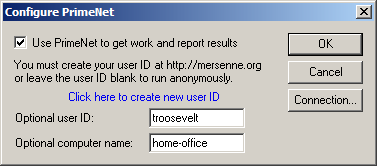
Enter your optional userID created on the website in Step 1, and optionally name your computer. We recommend Windows users select Options » Start at Bootup or Start at Logon.
That's all you need to do! The program contacts a central server called PrimeNet to get some work to do. Usually the program and PrimeNet know the best work to assign, but it's up to you!
You can administer your account and computers on your userID's account page. Once you complete a workunit you can track your standings on the
competitive stats pages the server updates every hour (see Top Producers in the menu, left, for more stats). You can monitor each of your
computers' progress, even remote-control the work assignments they request using your userID's CPUs page!
Linux and FreeBSD versions can also be set up to run every time you restart your computer.
Ask for help at the Mersenne Forum.
CPU Stress / Torture Testing
Prime95 has been a popular choice for stress / torture testing a CPU since its introduction, especially with overclockers and system builders. Since the software makes
heavy use of the processor's integer and floating point instructions, it feeds the processor a consistent and verifiable workload to test the stability of the CPU and the L1/L2/L3
processor cache. Additionally, it uses all of the cores of a multi-CPU / multi-core system to ensure a high-load stress test environment.
From the most recent "stress.txt" file included in the download:
Today's computers are not perfect. Even brand new systems from major manufacturers can have hidden flaws. If any of several key components such
as CPU, memory, cooling, etc. are not up to spec, it can lead to incorrect calculations and/or unexplained system crashes.
Overclocking is the practice of increasing the speed of the CPU and/or memory to make a machine faster at little cost. Typically, overclocking
involves pushing a machine past its limits and then backing off just a little bit.
For these reasons, both non-overclockers and overclockers need programs that test the stability of their computers. This is done by running
programs that put a heavy load on the computer. Though not originally designed for this purpose, this program is one of a few programs that
are excellent at stress testing a computer.
The Prime95 Wikipedia page has an excellent overview on using Prime95 to test
your system and ensure it is working properly. The tips presented there should be helpful regarding how long to run the torture test and provide a solid guideline
on how long to run the Prime95 stress test.
Appear in the list of linked accounts on the v4 migration page
Associate one v4_computers virtual CPU on your v5 account for each v4 account linked.
Note that the v4_computers virtual CPU is initially assigned to ANONYMOUS until you link your v4 account.
Create TWO fat CPU credits, one each for LL and TF, which contain the ENTIRE v4 credit accumulated prior to 10/20/2008.
These two fat credits should appear on your v5 account summary page.
Your V4 computers will continue to run, receive work assignments, return work results.
We will soon provide a way to distribute V4 shared work credit with other V5 users. Stay tuned!
Some work credits may be applied or corrected after we complete our data reconciliation in late November.
Not linking your v4 and v5 accounts is optional, but your V4 computer(s) will run under the v5 ANONYMOUS user.
Upgrading several computers incrementally over time is OK. There's no hurry.
To see each of your computers individually by name again you will need to upgrade the software.
Upgrade the software. Stop and exit your current version, then install the new version overwriting the previous version. You can upgrade even if you are in the middle of testing an exponent.
Please consult the readme.txt file for possible answers. You can also search for an answer, or ask for help in the
GIMPS forums. Otherwise, you will need to address your question to one of the two people who wrote the program.
Networking and server problems should be sent to Scott Kurowski. Such problems include errors contacting the server,
problems with assignments or userids, and errors on the server's statistics page. All other problems and questions should be sent to
George Woltman, but please consult the forums first.
Disclaimers
See GIMPS Terms and Conditions. However, please do send bug reports and suggestions for improvements.
Software Source Code
If you use GIMPS source code to find Mersenne primes, you must agree to adhere to the GIMPS free software license agreement.
Other than that restriction, you may use this code as you see fit.
The source code for the program is highly optimized Intel assembly language. There are many more-readable FFT algorithms available on the web and in textbooks.
The program is also completely non-portable. If you are curious anyway, you can
download all the source code (45.7MB). This file includes all the version 29.4b7 source code for Windows, Linux, FreeBSD, and Mac OS X. Last updated: 2018-01-05.
The GIMPS program is very loosely based on C code written by Richard Crandall. Luke Welsh has started a web page that points to Richard Crandall's program and
other available source code that you can use to help search for Mersenne primes.
Other available freeware
At this time, Ernst Mayer's Mlucas program and Guillermo Ballester Valor's Glucas
programs are the best choices for non-Intel architectures. Luke Welsh has a web page that points to available source code of
mostly historical interest you can use to help search for Mersenne primes.