

FREE MERSENNE PRIME SEARCH SOFTWARE
Version 25 software released for
PRIMENET 5.0!
Upgrade Instructions for Existing Users
Setup Instructions for New Users
Software Source Code
Free - you can't beat that price! You need a Pentium-class computer with Windows,
Mac, OS/2, Linux, or FreeBSD. You must also agree to the GIMPS
free software license.
PowerPC owners can also participate. Unix and non-x86 users should check out Ernst Mayer's Mlucas page and the Glucas page for guidance as to which code is best for their platform. The
How it Works page answers many questions you may have before downloading the software. In case of downloading difficulties, a Russian mirror site is available.
Upgrade Instructions for Existing Users
This version contains support for PrimeNet V5.0 and other improvements. See
the whatsnew.txt file for the full list of improvements.
Step 1. If you have not done so,
CREATE YOUR NEW V5.0 USER ID.
Optional, but required to link your v4 account(s) to keep work credit earned prior to 10/20/2008. You
can then check your new account
details and LINK YOUR OLD V4.0 PRIMENET USER ID(S)
.
- To link your V4 account, please first
create your new V5 account.
- All of your V4 computers will appear as a single virtual V5 computer, called v4_computers.
- Each v4 account linked should:
· appear in the list of linked accts on the v4
migration page.
· associate one v4_computers virtual CPU on
your v5 account for each v4 account linked;
Note that the v4_computers virtual CPU is initially assigned to ANONYMOUS until
you link your v4 account.
· create TWO fat CPU credits, one each for LL
and TF, which contain the ENTIRE v4 credit accumulated to 10/20/2008.
· these two fat credits should appear on your v5
account summary page.
- Your V4 computers will continue to run, receive work
assignments, return work results.
- We will soon provide a way to distribute V4 shared work
credit with other V5 users. Stay tuned!
- Some work credits may be applied or corrected after we
complete our data reconciliation in late November.
- Not linking your V4 and V5 accounts optional, but
your V4 computer(s) will run under the V5 ANONYMOUS user.
- Upgrading several computers incrementally
over time is OK. There's no hurry.
- To see each of your computers individually
by name again
you will need to upgrade the software.
- You can check the
details of your upgraded computers in PrimeNet V5.0.
Step 2. Upgrade the software. You can upgrade even if you are in the middle of testing an exponent.
- Save file and prime.spl formats are different so there is no going back.
- First allow the program to sync with
PrimeNet to unspool and delete the prime.spl file of unsent results.
- Stop and exit the current version of the program.
- You should make a backup copy of the entire
directory before upgrading.
- Upgrading in the middle of P-1 stage 2
will restart stage 2 from scratch.
- On dual and quad core machines, all CPUs
are now managed by a single program instance.
You
must manually merge the worktodo.ini files into the v25 worktodo.txt
(note the change in file suffix).
In the instances of Prime95 you will no longer need, uncheck Start at Bootup before you exit the program.
Save
files must be copied to the new v25 directory.
Step 3. Download the appropriate program for your OS:
WINDOWS,
MAC OS X,
LINUX,
WINDOWS 64-BIT,
LINUX 64-BIT
Step 4. Install the new version overwriting the previous version.
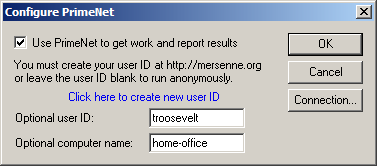
Step 5. Restart the program and enter your new V5 user ID and name your
computer.

Step 6. Read whatsnew.txt.
Setup Instructions for New Users
Joining GIMPS is usually as simple as downloading and running the program, answering a few questions, and the program does the rest.
The How it Works page answers many questions you
may have before downloading the software.
You must also agree to the GIMPS
free software license. There may be
cash awards for discovering a prime.
Step 1.If you have not done so,
CREATE YOUR NEW USERID. It's
optional, but required to check your
account details, computer status and performance statistics and to assign
computers to your user ID.
Step 2.Download the appropriate free program for your OS:
WINDOWS,
MAC OS X,
LINUX,
WINDOWS 64-BIT,
LINUX 64-BIT
The same programs and a few more, with more details:
- Windows Vista/XP/2003/2000/NT/Me/98/95: Download
p95v258.zip,
version 25.8, last updated December 16, 2008.
- Windows 64-bit: Download
p64v258.zip, version 25.8 last updated
December 15, 2008.
- Mac OS X: Download
mprime258-MacOSX.tar.gz, version 25.8, last updated
December 15, 2008.
- Linux: Download
mprime258.tar.gz, version 25.8, last updated
December 15, 2008. Compiled under Fedora core 3 using kernel 2.6.9-1.667. If you are running an older version of
Linux and having troubles, then maybe one of the older versions of mprime
using the PrimeNet 4.0 protocol will work.
- Linux 64-bit: Download
mprime258-linux64.tar.gz, version 25.8, last updated
December 15, 2008.
- Windows NT/2000/XP/Vista Service: This is for administrators that want the extra security of running a traditional GUI-less service. You will still need to download the standard windows executable to configure the client. This program is for Windows NT experts only. Download winnt258.zip(832KB). Version 25.8, last updated December 15, 2008.
- Windows XP/Vista 64-bit Service: This is for administrators that want the extra security of running a traditional GUI-less service. You will still need to download the standard windows executable to configure the client. This program is for Windows NT experts only. Download win64nt258.zip(837KB). Version 25.8, last updated December 15, 2008.
- FreeBSD: Download sprime2414-freebsd.tar.gz(873KB). Version 24.14, last updated August 9, 2005.
This version uses the PrimeNet 4.0 protocol.
- OS/2: Max Alekseyev has ported the Linux version to OS/2. Download his os2v2414.zip(1.2MB) zipped executable. Version 24.14, last updated February 3, 2006.
This version uses the PrimeNet 4.0 protocol.
Step 3. Create a directory and decompress the file you just downloaded.
Windows Vista and XP have built-in unzip features. Other Windows users can choose from a variety of decompression programs. Some are PKZip, WinZip, or dozens of others at Tucows. Linux and FreeBSD users should use the standard tar and gzip decompression utilities.
Step 4. Joining GIMPS is usually as simple as running the program, answering a few questions, and the program does the rest. It contacts a central server to get some work to do. There are several ways to set up the program to run every time you restart your computer. You can track your progress on
stats pages the server updates every hour (see
Top Producers in the menu, left, for more stats). Read the readme.txt file for more detailed instructions.

Step 5. Questions and problems. Consult the readme.txt file for possible answers. You can also search for an answer, or ask for help in the GIMPS forums. Otherwise, you will need to address your question to one of the two people who wrote the program. Networking and server problems should be sent to Scott Kurowski. Such problems include errors contacting the server, problems with assignments or userids, and errors on the server's statistics page. All other problems and questions should be sent to George Woltman,
but please consult the forums first.
Disclaimers: See GIMPS
Terms and Conditions.
However, please do send bug reports and suggestions for improvements.
Software for UNIX machines
What to do if you're running UNIX? Luke Welsh has a web page that points to
available source code you can use to help search for Mersenne primes.
At this time, Ernst Mayer's Mlucas program and
Guillermo Ballester Valor's Glucas program are the best choices.
Software for StrongARM machines
What to do if you own a StrongARM? Nick Craig-Wood has written a program for this CPU! His web site has all the details.
Software Source Code
If you use GIMPS source code to find Mersenne primes, you must agree to adhere to the
GIMPS free software license agreement. Other than that restriction, you may use this code as you see fit.
The source code for the program is highly optimized Intel assembly language.
There are many more-readable FFT algorithms available on the web and in textbooks.
The program is also completely non-portable. If you are curious anyway,
you can download all the
source code(4.1MB). This file includes all the version 25.8 source code for
Windows 95/98/Me, Windows NT/2000/XP/Vista, Linux, FreeBSD, and Mac OS X. Use the -d option
in pkunzip to unzip the source. Last updated: December 15, 2008.
The GIMPS program is very loosely based on C code written by Richard Crandall. Luke Welsh has started a web page that points to Richard Crandall's program and
other available source code you can use to help search for Mersenne primes. This is a great place for UNIX users to go.
Last updated: December 16, 2008